Your Nella library
Where your management accounts and documents live, how to add your own, and how to open them in Claude.
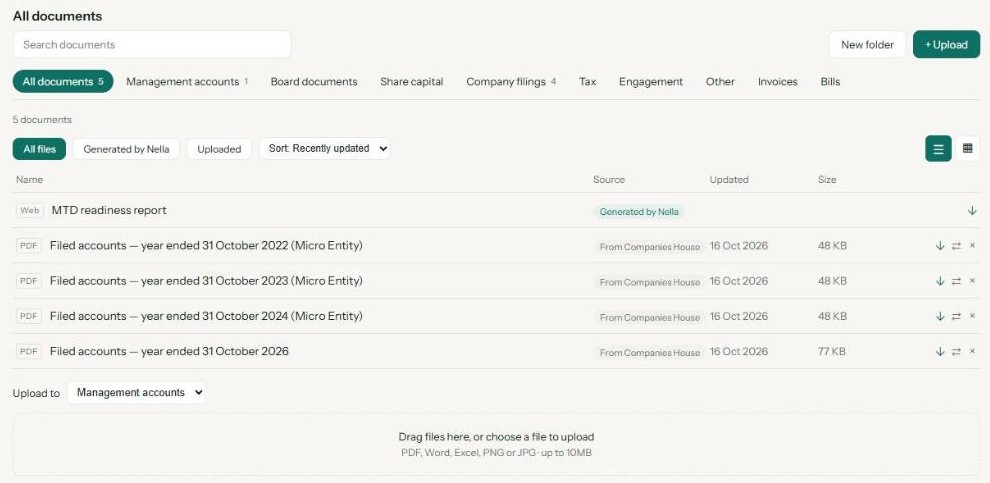
Your library is where Nella keeps your monthly management accounts, alongside any documents you upload yourself: engagement letters, board papers, tax returns, contracts. Open it in your Nella portal under Library, or ask Nella in Claude what’s in it.
What’s in your library
- Your monthly management accounts. Nella builds a pack for each completed month and files it here automatically. These are marked Generated by Nella.
- Documents you upload. Anything you add yourself is marked Uploaded.
- Filed accounts from Companies House. For UK limited companies, the accounts you have filed appear here marked From Companies House.
Documents sit in sections: Management accounts, Board documents, Share capital, Company filings, Tax, Engagement and Other. Choose All documents to see everything at once.
The Invoices and Bills tabs work differently. They show documents from your accounting software (Xero, QuickBooks, Sage or FreeAgent) when you open them. Nella reads them at that moment and doesn’t keep a copy, so they never take up space in your library.
Add a document
- Sign in to your Nella portal and open Library.
- Select Upload.
- Under Upload to, choose the section, and a folder if you use them.
- Pick your file. PDF, Word, Excel, PNG and JPG files up to 10MB are accepted.
- While the file is checked for safety it shows Scanning…. Once the check passes it’s ready to open. If it doesn’t pass, it isn’t added and Nella tells you why.
The same file can’t be added twice to one section. If you see “This file is already in this section”, it’s already there.
Organise with folders
Inside any section, select New folder to group related documents, for example one folder per tax year. You can move a document into a folder at any time.
Find, preview and download
- Use Search documents to find a document by name.
- Select a document to preview it. PDFs and images open in the portal; Word and Excel files download so they open in the original app.
- Filter to Generated by Nella or Uploaded, and sort by recently updated, name, date added or size.
Remove a document
Select the × next to the document, then confirm. It’s taken out of your library.
Use your library in Claude
If you use Nella in Claude, you can ask about your library in plain English:
- “What’s in my Nella library?”
- “Open my September management accounts.”
- “Show me the documents in my Tax section.”
Nella lists your documents and can attach a file of up to 2MB straight into the chat. Larger files open from your portal. Nella only ever shows your own library.
📷 Screenshot to add: a Claude conversation where Nella lists the library and opens a management accounts pack.
In ChatGPT, ask Nella for a link to your latest management accounts instead. To add documents, use the portal — uploading through ChatGPT or Claude isn’t available.
Nella provides financial information and education, not accounting or tax advice.
Connect your accounting software
Connect Xero, QuickBooks, Sage or FreeAgent in about two minutes, choose the right business, and reconnect if the link breaks.
Use Nella in ChatGPT
Add the Nella app to ChatGPT, sign in, and ask about your numbers in plain English.
Use Nella in Claude
Add Nella as a connector in Claude, sign in, and ask about your numbers in plain English.
Monthly management accounts
What's in your monthly pack, when it arrives, and where to find it.
Tasks and alerts
The summaries and alerts Nella sends you, and how to change when and whether they run.
Your Nella Score
What your score out of 100 measures, what the bands mean, and why it can change.