Connect your accounting software
Connect Xero, QuickBooks, Sage or FreeAgent in about two minutes, choose the right business, and reconnect if the link breaks.
Nella works from your accounting software. Connecting takes about two minutes: start your free trial at nellafinance.co.uk, choose Xero, QuickBooks, Sage or FreeAgent, and sign in to approve. Nella then reads your figures and builds your first pack, usually in under two minutes. No card is needed.
Connect, step by step
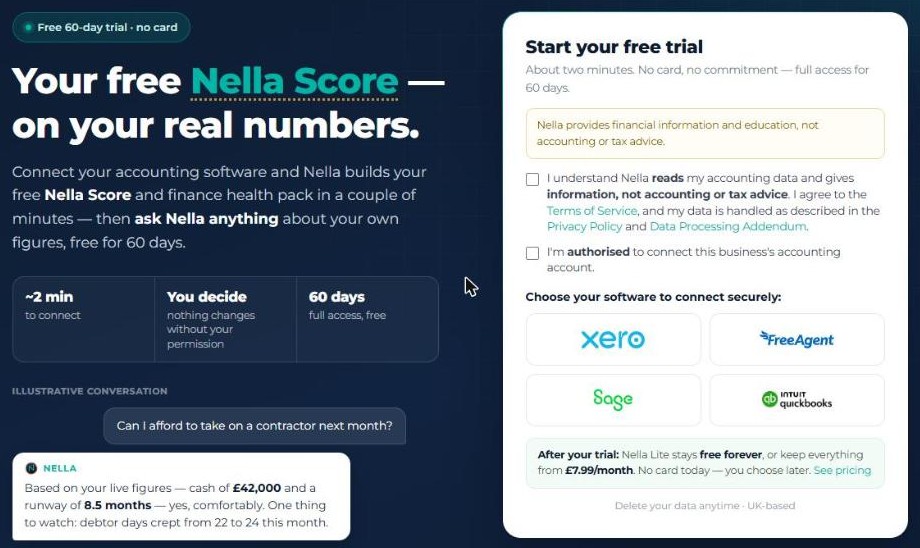
- Go to nellafinance.co.uk/trial/start.
- Tick the two boxes: that you understand Nella reads your accounting data and gives information, not accounting or tax advice (and agree to the Terms); and that you’re authorised to connect this business’s accounting account.
- Under Choose your software to connect securely, select your accounting software.
- Sign in to your accounting software on its own page, choose the business you want Nella to read, and approve the connection.
- You’re brought back to Nella, which shows Nella is building your pack. Keep the page open — it updates by itself and takes you to your pack when it’s ready.
The connection link lasts an hour. If you leave it longer, just start again from the trial page.
Choosing the right business
Nella reads one business per connection.
- Xero: pick one organisation on Xero’s screen. If you tick several, Nella uses the one updated most recently and disconnects the others.
- QuickBooks: pick the company on Intuit’s screen.
- Sage: Nella reads the first business on your Sage login. If you have more than one, sign in with a login that has access to the right business.
- FreeAgent: Nella reads the company on your FreeAgent login.
If you see No organisation was chosen, try again and pick the business on your accounting software’s screen.
What Nella can see
Nella reads your reports, invoices and bills, bank feed status and chart of accounts. Nothing in your books changes unless you give permission in Nella.
The permission screen you see comes from your accounting software, so its wording differs by platform. QuickBooks, for example, only offers one level of accounting access to apps, so its screen describes more than Nella reads.
After you connect
- Your first pack and Nella Score are ready to view.
- Your first monthly management accounts follow, usually within about 15 minutes.
- Four tasks are switched on for you: a weekly cashflow summary, a weekly overdue-invoices summary, your monthly performance report, and a connection check. See Tasks and alerts.
- Nella works out your country and currency from your accounting software, and shows statutory dates and terms for that country where it can.
If your books don’t have enough in them yet
If you see You’re connected but no pack, the connection is working — your books just don’t have enough recorded yet. Record your sales invoices and bills; once your latest complete month has sales or costs recorded, that’s enough. While your connection is active, Nella checks again every Sunday and builds your pack automatically.
Reconnecting
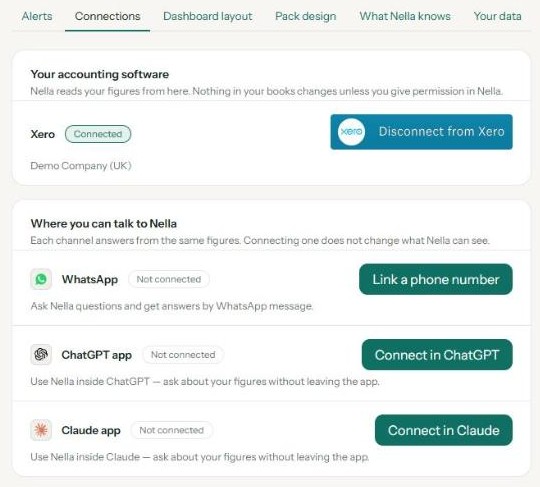
If Nella can no longer read your accounting software, every portal page shows a banner: Nella can’t currently read your accounting platform. Your figures won’t update until you reconnect.
- Xero and QuickBooks: choose Connect to Xero or Connect to QuickBooks on the banner, or in Settings under Connections. Pick the same business as before — your history and trial stay as they are.
- Sage and FreeAgent: get in touch and we’ll help you reconnect.
Your trial
Your trial gives you full access for 60 days from when you connect, with no card. After that you move to Nella Lite, which stays free, or you can keep everything on Nella Paid. Nothing is deleted when the trial ends — though if you stay on Lite and don’t use Nella, your trial data is erased 90 days after your first pack. See plans and pricing.
Nella reads one business per connection. If you want Nella for a second business, get in touch.
Nella provides financial information and education, not accounting or tax advice.
Use Nella in ChatGPT
Add the Nella app to ChatGPT, sign in, and ask about your numbers in plain English.
Use Nella in Claude
Add Nella as a connector in Claude, sign in, and ask about your numbers in plain English.
Your Nella library
Where your management accounts and documents live, how to add your own, and how to open them in Claude.
Monthly management accounts
What's in your monthly pack, when it arrives, and where to find it.
Tasks and alerts
The summaries and alerts Nella sends you, and how to change when and whether they run.
Your Nella Score
What your score out of 100 measures, what the bands mean, and why it can change.