Use Nella in ChatGPT
Add the Nella app to ChatGPT, sign in, and ask about your numbers in plain English.
You can ask Nella about your business’s numbers inside ChatGPT. Add the Nella app, sign in with your email or Google, and ask in plain English — answers come from your own accounting software. If you’re new to Nella, you can start your free trial during the same sign-in.
Add Nella to ChatGPT
- Open Nella in ChatGPT and choose Connect.
- A Nella page opens, showing Connecting via ChatGPT.
- Already use Nella? Choose I have an account, enter your email and choose Continue, or choose Continue with Google.
- New to Nella? Choose New to Nella, pick your accounting software, tick the box to confirm you’re authorised, then enter your email and choose Create my account — or Continue with Google. You’ll then connect your accounting software; see Connect your accounting software.
- If you used your email address, check your inbox. Returning users get Your Nella sign-in link: choose Finish connecting (it works once and expires after 2 hours). New users get Verify your email to start your Nella trial: choose Confirm my email address (it lasts 24 hours). The page that opens tells you to go back to finish. If you started in the ChatGPT desktop app, it shows a code instead: enter it in ChatGPT under I have an account.
- Go back to ChatGPT and ask Nella a question.
📷 Screenshot to add: the “Connect Nella” page showing “Connecting via ChatGPT” and the two tabs.
There’s no Nella password. You sign in with a link sent to your email, or with Google.
Questions to try
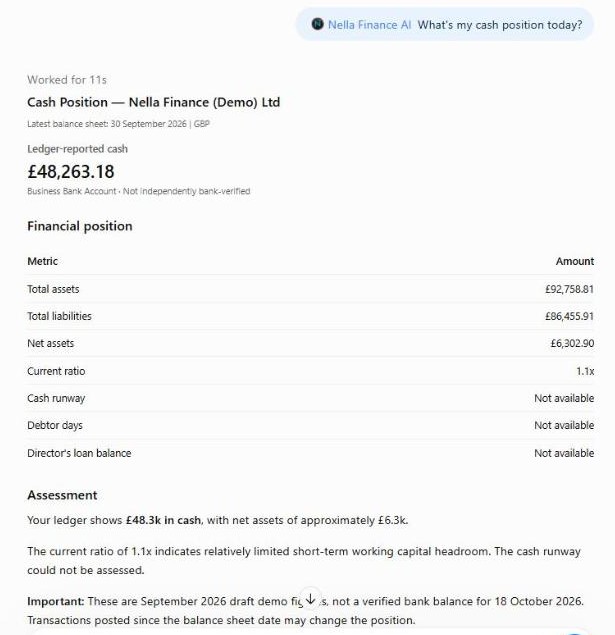
- “What’s my cash position today?”
- “Show me my cash forecast.”
- “How did this month compare with last month and last year?”
- “Who owes me money, and how overdue are they?”
- “When are my filing deadlines?”
- “Are my books ready to close for September?”
- “Get me the link to my latest management accounts.”
Good to know
- Your first question can take a little longer while Nella reads your latest figures. After that, answers come quickly.
- Figures come from your accounting software, so they’re only as up to date as your books. Cash is the figure in your books, not a live bank balance.
- Nella only reads. In ChatGPT it posts nothing to your accounting software, files nothing, pays nothing and moves no money.
- Invoices and bills from your accounting software can be opened in the chat. Files over 2MB come as a download link instead.
- Answers are information, not advice. For filing or decisions, speak to a qualified accountant.
- Your plan. Nella in ChatGPT is included during your free trial and on Nella Paid. It isn’t included on Nella Lite.
Remove Nella from ChatGPT
Remove the Nella app from your connected apps in ChatGPT’s settings. ChatGPT can then no longer reach your Nella data. Your Nella account and accounting connection stay as they are; to delete those too, see Your data and disconnecting.
Nella provides financial information and education, not accounting or tax advice.
Connect your accounting software
Connect Xero, QuickBooks, Sage or FreeAgent in about two minutes, choose the right business, and reconnect if the link breaks.
Use Nella in Claude
Add Nella as a connector in Claude, sign in, and ask about your numbers in plain English.
Your Nella library
Where your management accounts and documents live, how to add your own, and how to open them in Claude.
Monthly management accounts
What's in your monthly pack, when it arrives, and where to find it.
Tasks and alerts
The summaries and alerts Nella sends you, and how to change when and whether they run.
Your Nella Score
What your score out of 100 measures, what the bands mean, and why it can change.