Tasks and alerts
The summaries and alerts Nella sends you, and how to change when and whether they run.
Tasks are the things Nella keeps an eye on for you: regular summaries that arrive on a schedule, and alerts that arrive when something changes. You switch them on and off, and choose when they run, on the Tasks page of your Nella portal.
Tasks Nella switches on for you
When you connect your accounting software, Nella turns on four tasks:
- Cashflow summary — every Monday at 08:30.
- Overdue invoices — invoices past their due date, oldest first, every Monday at 09:00.
- Monthly performance report — your management accounts, on the 3rd of each month.
- Connection check — tells you if Nella stops being able to read your accounting software.
All the tasks you can choose
On the Tasks page they’re grouped by topic: Cash, Debtors, Spend, Performance and Your connection.
| Task | How often |
|---|---|
| Cash update | Daily, weekly or monthly |
| Cashflow summary | Daily, weekly or monthly |
| Revenue and spend | Daily, weekly or monthly |
| Overdue invoices | Daily, weekly or monthly |
| Aged debtor summary | Weekly or monthly |
| Top customers | Weekly or monthly |
| Margin watch | Weekly or monthly |
| Subscription review | Monthly |
| Monthly performance report | Monthly |
| Cash threshold alert | When it changes |
| Unusual spend alert | When it changes |
| Connection check | When it changes |
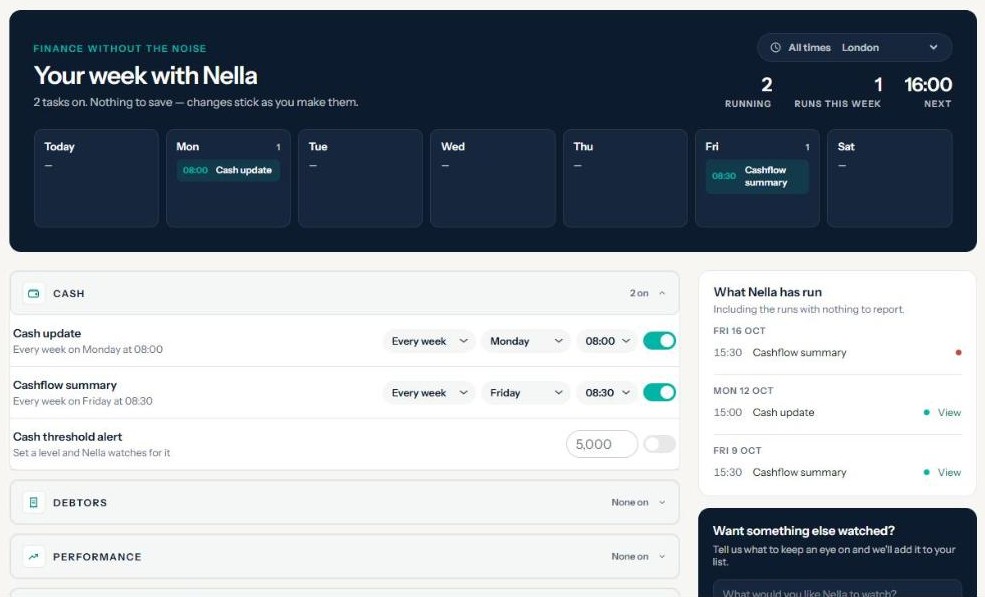
Change a task
- In your Nella portal, open Tasks.
- Use the switch next to a task to turn it on or off.
- Choose how often it runs (Every day, Every week or Every month), then the day of the week or the date (1 to 28), and the time (between 06:00 and 22:00).
There’s nothing to save — each change is kept as you make it, and you’ll see Saved.
Tasks run in your time zone, shown at the top as All times and your zone. If it’s wrong, change it there and every task moves to the same local time in the new zone.
How alerts work
- Cash threshold alert — enter the cash level you want watched. Nella tells you when your cash drops below it, and again when it’s back above. If your cash is already below the level when you set it, Nella treats that as the starting point and alerts you when it changes.
- Unusual spend alert — enter an amount, and Nella tells you when any cost line rises by more than that compared with last month.
- Connection check — tells you if Nella can’t reach your accounting software, and again when it’s connected.
Alerts tell you when something changes, not every day it stays the same, and the same alert won’t repeat within 20 hours — so they won’t fill your inbox.
Where tasks arrive
Tasks arrive in your Nella portal and by email, at the address shown under Where it lands on the Tasks page. Use Change in settings there to update it.
What Nella has run lists every recent run, including the ones with nothing to report.
Want something else watched?
Choose Request a task on the Tasks page and tell us what you’d like Nella to keep an eye on.
Your plan
All tasks are included during your free trial and on Nella Paid. Nella Lite doesn’t include tasks; a frequency your plan doesn’t cover shows Not in your plan.
Nella provides financial information and education, not accounting or tax advice.
Connect your accounting software
Connect Xero, QuickBooks, Sage or FreeAgent in about two minutes, choose the right business, and reconnect if the link breaks.
Use Nella in ChatGPT
Add the Nella app to ChatGPT, sign in, and ask about your numbers in plain English.
Use Nella in Claude
Add Nella as a connector in Claude, sign in, and ask about your numbers in plain English.
Your Nella library
Where your management accounts and documents live, how to add your own, and how to open them in Claude.
Monthly management accounts
What's in your monthly pack, when it arrives, and where to find it.
Your Nella Score
What your score out of 100 measures, what the bands mean, and why it can change.