Your data and disconnecting
What Nella keeps, how to disconnect your accounting software or AI apps, and how to delete your data.
You’re in control of your data. Nella reads your accounting software rather than copying your ledger, your data is never used to train AI models, and you can disconnect or delete everything from your Nella portal settings.
What Nella keeps, and what it only reads
- Kept: the figures Nella works out from your books (such as totals, KPIs and your Nella Score), your packs and management accounts, the names of your largest customers and suppliers for concentration analysis, documents you upload, and your conversations with Nella.
- Read only when you ask: invoices, bills and receipts from your accounting software. Nella fetches them when you open them and doesn’t keep a copy.
- Protected: the access to your accounting software is stored encrypted, and Nella is hosted in AWS’s London region.
The full detail, including how long each kind of data is kept, is in our Privacy Policy and on the security and data page.
Disconnect your accounting software
Xero and QuickBooks: in your Nella portal, open Settings, then Connections. Under Your accounting software, choose Disconnect from Xero or Disconnect from QuickBooks, and confirm.
Sage and FreeAgent: remove Nella in your accounting software’s connected-apps settings.
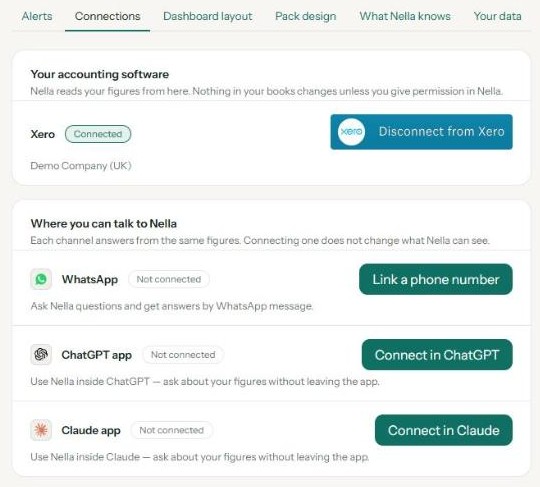
Nella stops reading your books straight away, and nothing in your books is changed. Your figures are kept for 30 days in case you reconnect; if you don’t, they’re erased automatically. If you remove Nella from inside your accounting software instead, we’ll email you once it has been disconnected for a day, and your figures are kept for 30 days from that email.
Disconnect ChatGPT or Claude
Remove Nella from the connected apps or connectors in ChatGPT or Claude. That app can no longer reach your Nella data; your accounting connection and your other apps carry on. See Use Nella in ChatGPT and Use Nella in Claude. Deleting your data, below, also removes access from both.
Delete your data
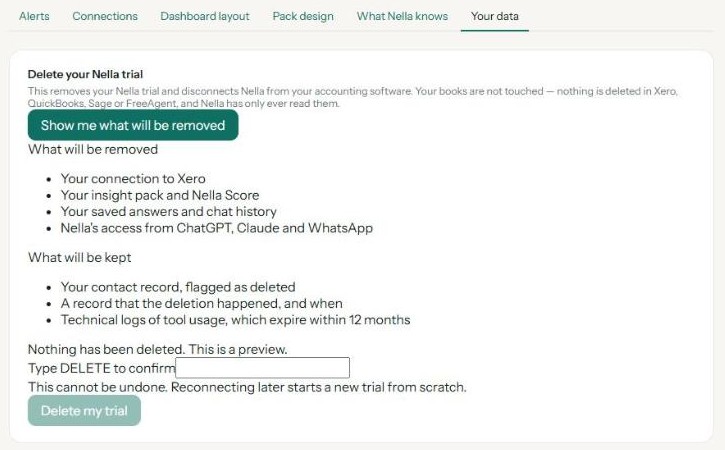
- In your Nella portal, open Settings, then Your data.
- Under Delete your Nella trial, choose Show me what will be removed to check the list first.
- Type DELETE and choose Delete my trial.
This removes your accounting connection, your pack and Nella Score, your saved answers and chat history, and access from ChatGPT, Claude and WhatsApp. It can’t be undone; connecting again later starts a new trial from scratch.
A few things are kept, as the deletion screen lists: a record that the deletion happened and when, your contact record marked as deleted, and technical logs of tool use, which expire within 12 months.
When your trial ends
Nothing is deleted when your 60-day trial ends — you move to Nella Lite. If you stay on Lite and don’t use Nella, your trial data — your connection, figures and packs — is erased 90 days after your first pack. It’s kept while you keep using Nella, and on a paid plan.
Questions about your data
Email security@nellafinance.co.uk. Nella Finance AI Ltd is registered with the UK Information Commissioner’s Office as a data controller, reference ZC224350.
Nella provides financial information and education, not accounting or tax advice.
Connect your accounting software
Connect Xero, QuickBooks, Sage or FreeAgent in about two minutes, choose the right business, and reconnect if the link breaks.
Use Nella in ChatGPT
Add the Nella app to ChatGPT, sign in, and ask about your numbers in plain English.
Use Nella in Claude
Add Nella as a connector in Claude, sign in, and ask about your numbers in plain English.
Your Nella library
Where your management accounts and documents live, how to add your own, and how to open them in Claude.
Monthly management accounts
What's in your monthly pack, when it arrives, and where to find it.
Tasks and alerts
The summaries and alerts Nella sends you, and how to change when and whether they run.