Your Nella Score
What your score out of 100 measures, what the bands mean, and why it can change.
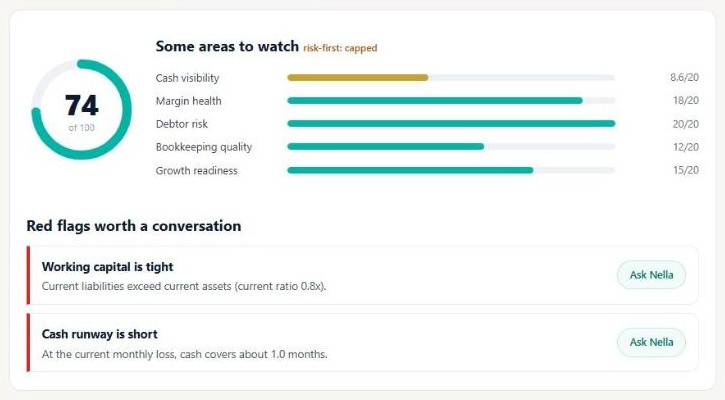
Your Nella Score is a finance health check out of 100, worked out from the figures in your accounting software. It looks at five areas of your business, each scored out of 20, and shows which areas are holding the overall score back.
The five areas
- Cash visibility — how long your cash would last at your current rate of spending, how cash has moved over recent months, and whether your bank is reconciled where your accounting software lets Nella check it.
- Margin health — your gross and net margins, and how your net margin has moved over time.
- Debtor risk — how long, on average, customers take to pay you.
- Bookkeeping quality — whether the core reports can be read, how many transactions are still uncategorised, and whether your bank is reconciled where your accounting software lets Nella check it. When reconciliation can’t be checked, this area is capped at 12 out of 20.
- Growth readiness — how your revenue is trending, whether you are profitable, and how your short-term assets compare with your short-term liabilities.
Every area counts equally. Parts that look at trends only count once Nella can see at least three months of history.
What the bands mean
| Score | Band |
|---|---|
| 80 to 100 | Strong |
| 65 to 79 | Healthy |
| 50 to 64 | Some areas to watch |
| 35 to 49 | Several areas to address |
| 0 to 34 | Needs attention |
The band looks at risk first. If any single area scores very low, or Nella finds a serious red flag, the band shown is no better than Some areas to watch, even when the number alone would place you higher.
When your books aren’t up to date
Nella can only score what it can see. If your books aren’t current — for example your bank isn’t reconciled to the end of the period, transactions are uncategorised, or your bank feed has stopped — the score is marked provisional. It is capped at 50 and you’ll see the red flag Books need bringing up to date.
Areas Nella can’t assess
If Nella doesn’t have the data for an area, that area shows not assessed. It is left out rather than counted as zero, and your score is worked out from the areas that could be assessed. If fewer than four of the five areas can be assessed, Nella shows Not enough data yet instead of a number.
Some accounting platforms share less detail than others, so the same business can have fewer areas assessed on one platform than another. The Nella Score is not calculated for charities.
When it’s calculated, and why it can change
- When you first connect, Nella works out your score straight away from your current figures.
- A few minutes later, once Nella has finished checking the health of your books, the score is worked out again with those results. It can move at this point, usually because the check found something that makes the score provisional.
- In your Nella portal, the score on the Nella Score tab is worked out each time you open it, from the figures Nella holds for you. It can differ from the score in your first pack: it counts trends once there is enough history, and it doesn’t include the bookkeeping health check that can make the first-pack score provisional.
Where to see it
- On your insight pack, straight after you connect.
- In your Nella portal, on the Nella Score tab.
- In the PDF of your insight pack.
Each red flag has an Ask Nella button, so you can ask what’s behind it in plain English.
What moves the score
Each area moves with what it measures: cash runway, bank reconciliation, margins, how quickly customers pay, how many transactions are uncategorised, and your revenue and profit trends. Bookkeeping quality is usually the quickest to change, because uncategorised items and unreconciled bank lines are within your control. Nella shows you where the score stands; it doesn’t tell you what to do about it.
What the Nella Score is not
It is not a credit score and has no bearing on your credit file. It is not a rating issued by any regulator, lender or professional body. It is not a measure of tax compliance or filing status, and it doesn’t compare you with other businesses. And it is not financial or tax advice.
More on how the score is built is on the Nella Score page.
Nella provides financial information and education, not accounting or tax advice.
Connect your accounting software
Connect Xero, QuickBooks, Sage or FreeAgent in about two minutes, choose the right business, and reconnect if the link breaks.
Use Nella in ChatGPT
Add the Nella app to ChatGPT, sign in, and ask about your numbers in plain English.
Use Nella in Claude
Add Nella as a connector in Claude, sign in, and ask about your numbers in plain English.
Your Nella library
Where your management accounts and documents live, how to add your own, and how to open them in Claude.
Monthly management accounts
What's in your monthly pack, when it arrives, and where to find it.
Tasks and alerts
The summaries and alerts Nella sends you, and how to change when and whether they run.